
Best Gaming Laptop for Game Award 2025 : Specs Reviewed


Technology Jounalist & Hardware Reviewer
Kristine Tang covers the intersection of gaming and technology at Bright Side of News. Known for her approachable breakdowns of complex hardware, she focuses on helping new creators understand the tools professionals use — from GPUs to capture cards. When she’s not benchmarking devices, she’s exploring how tech empowers the next generation of streamers.
🐦 💼
 The Game Awards tend to bring out the best of the best each year — the games that made people talk, the ones that took technical leaps, and the ones that reminded us why this industry evolves so quickly. Game Awards 2025 nominees usually sit at the intersection of creativity and raw tech ambition, which makes them a surprisingly good reflection of where game development is heading.
A lot of players use the nominees as a winter-sale wishlist (and honestly, same). But from a hardware perspective, this list tells us something more practical: what kind of gaming laptop you actually need in 2025. The studios behind these games build them to shine on today’s hardware, and their recommended specs often match the wider trend we see across new AAA releases.
So instead of guessing what counts as “future-proof,” we’re taking the straightforward approach — look at the games everyone else is benchmarking their rigs with, understand the performance patterns, and turn those into a simple guide for anyone buying a gaming laptop this year.
GOTY 2025 Nominees: Requirements
To understand what a “GOTY-ready” gaming laptop actually looks like, we pulled together the recommended PC specs of 15 major titles shaping the 2025 awards conversation. Some are official Game Awards 2025 nominees, others are heavy hitters often discussed in the same breath — but all of them represent the kind of games developers are building around right now.
We’re keeping this simple: no story summaries, no trailers, just the hardware expectations. Here’s how the Game Awards 2025-relevant lineup translates into real-world system requirements.
| Game | Recommended GPU | Recommended CPU | RAM | Storage | Notes |
| Clair Obscur: Expedition 33 | RTX 3060 | i7-9700 / R7 3700X | 16GB | 55GB SSD | UE5, heavy textures |
| Hades II | GTX 1060 | i5-8400 | 8GB | 20GB SSD | Lightweight, 2.5D |
| Hollow Knight: Silksong | GTX 1050 Ti | i5-8400 | 8GB | 20GB SSD | Very lightweight |
| Kingdom Come: Deliverance II | RTX 3060 / RX 6700 XT | i7-10700 | 16GB | 70GB SSD | Demanding open-world |
| Monster Hunter Wilds | RTX 3070 / RX 6800 | i7-10700 / R7 5800X | 16GB | 100GB SSD | Very demanding |
| Battlefield 6 | RTX 3080 | i7-12700K | 16–32GB | 100GB SSD | Extremely GPU-intensive |
| Indiana Jones and the Great Circle | RTX 3060 | i7-10700 | 16GB | 70GB SSD | Cinematic AAA adventure |
| Silent Hill f | RTX 2070 | i7-9700K | 16GB | 50GB SSD | Heavy post-processing |
| The Outer Worlds 2 | RTX 3060 | i7-10700 | 16GB | 80GB SSD | Large cinematic RPG |
| Split Fiction | RTX 2060 | i5-9600K | 16GB | 50GB SSD | AA action-adventure |
| The Alters | RTX 2060 | i7-9700 | 16GB | 40GB SSD | Single-player sci-fi |
| Peak | GTX 1660 Super | i5-9400 | 16GB | 20–30GB | Stylized 3D indie |
| Blue Prince | GTX 1060 | i5-8400 | 8–16GB | 25GB SSD | Lightweight indie |
| Marvel Rivals | GTX 1060 / RTX 2060 | i5-9400F | 16GB | 30GB SSD | MOBA / hero shooter |
| Dispatch | GTX 1050 Ti | i5-8400 | 8GB | 20GB SSD | Narrative / puzzle-style, low load |
What Specs You Actually Need to Run All Game of the Year
Game Awards 2025 nominees give us a good sense of what modern games are built for — and what laptops are expected to handle in 2025. Rather than chasing “future-proof” labels, it’s more useful to look at the performance patterns behind these titles and translate them into realistic laptop expectations. Here’s the whole spec as a single clean block:
GOTY 2025 Master Recommended Specs (Laptop)
- GPU: NVIDIA RTX 4070 (8GB)
- CPU: Intel i7-13620H / i7-12700H
or Ryzen 7 7840HS - RAM: 32GB DDR5
- Storage: 1TB NVMe SSD (Gen 4 preferred)
- Display: 1440p (or 1600p) 165Hz
- Cooling: Dual-fan or vapor chamber recommended
- Power: 140W GPU wattage preferred for RTX 4070 laptops
This configuration is capable of running all GOTY 2025 titles — including Battlefield 6, Monster Hunter Wilds,
Kingdom Come: Deliverance II, and Clair Obscur: Expedition 33 — at stable performance across 1080p or 1440p.
This master spec can comfortably run:
- ALL 6 Game Awards 2025 titles
- ALL 9 secondary nominees
- Modern AAA title releasing between 2024–2025
- UE5, ray tracing, large open worlds, and physics-heavy titles
Best Gaming Laptop for Game Awards 2025
1) Lenovo LOQ 16 (RTX 4060)
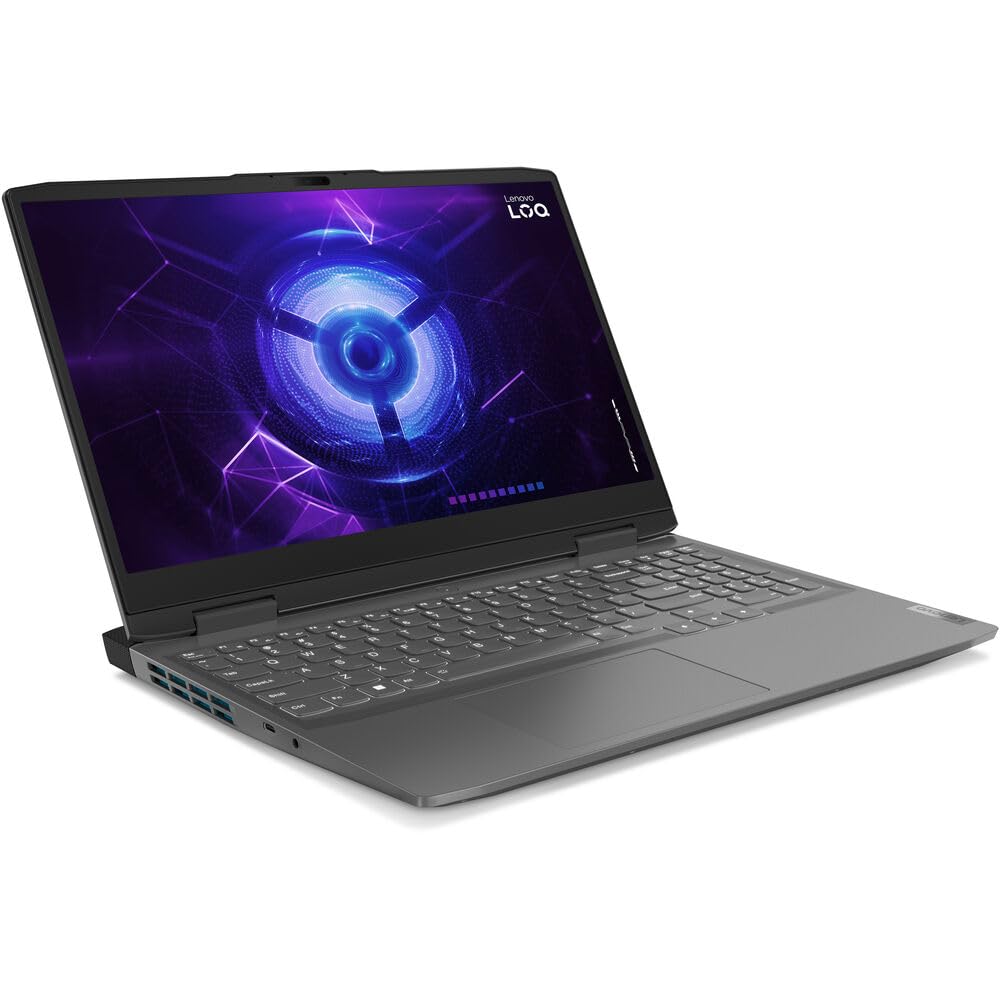
| Specification | Lenovo LOQ 16 (RTX 4060) | Our Master Spec |
| GPU | RTX 4060 (8GB, 85–95W) | RTX 4070 (8GB, 140W) |
| CPU | i5-13500H / i7-13700H | i7-12700H / Ryzen 7 7840HS |
| RAM | 16GB DDR5 (Upgradeable) | 32GB DDR5 |
| Storage | 512GB / 1TB NVMe SSD | 1TB NVMe SSD |
| Display | 16″ 1080p/1600p 144Hz | 1440p 165Hz |
| Cooling | Dual-Fan (mid-range) | Dual-fan / Vapor chamber |
| Best Use Case | Indie & mid-demand AAA titles | All GOTY 2025 titles |
The Lenovo LOQ 16 is a “bigger, calmer, cooler” take on the entry-level gaming laptop formula. Thanks to its 16-inch chassis, this model delivers more stable thermals and smoother long-session performance compared to most budget 15-inch machines. In the gaming community, LOQ laptops are often praised as the “budget Legion experience” — not premium, not flashy, just solid and dependable.
For players focused on indie and stylized GOTY titles, the RTX 4060 inside the LOQ 16 offers more than enough horsepower to run everything smoothly at 1080p or 1440p. It’s the kind of machine that doesn’t brag — it just gets the job done comfortably.
Who It’s For
🎮 Casual Gamer
🕹 Indie Lovers
📚 Café & Library Usage
This laptop is built for chill and comfort-first gamers — the kind of player who enjoys a breezy afternoon with a cold drink in hand while Silksong’s Choral Chamber politely destroys their sanity. If your gaming diet is a mix of Hades II, Marvel Rivals, and visually rich indie gems, the LOQ 16 gives you a big screen, smooth frames, and a stable pace without stressing your wallet.
It’s perfect for students, casual nightly gamers, and anyone who prefers a relaxed setup that still performs when needed.
GOTY Titles This Laptop Can Run Smoothly
- Hades II — 1080p/1440p High–Ultra
- Hollow Knight: Silksong — Max settings
- Marvel Rivals — 1080p/1440p High
- Peak
- Blue Prince
- Dispatch
- Monster Hunter Wilds — 1080p High + DLSS
- Battlefield 6 — 1080p Medium/High
2)ASUS TUF A16 (RTX 4050 / 4060)
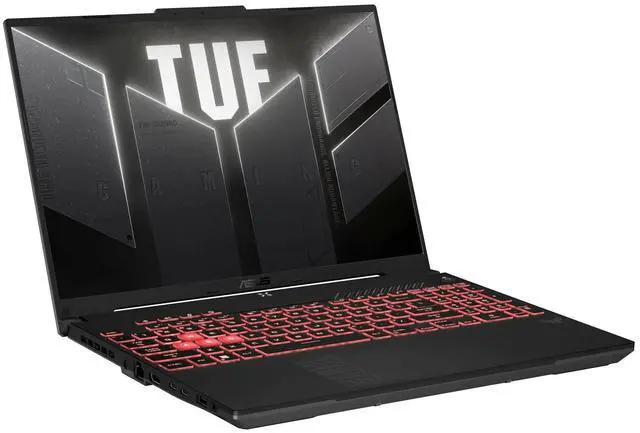
Spec Comparison Summary
| Specification | ASUS TUF A16 (RTX 4050 / 4060) | Our Master Spec |
| GPU | RTX 4050 (6GB, 75W) / RTX 4060 (8GB, 100W) | RTX 4070 (8GB, 140W) |
| CPU | Ryzen 7 7735HS / 7840HS | i7-12700H / Ryzen 7 7840HS |
| RAM | 16GB DDR5 (Upgradeable) | 32GB DDR5 |
| Storage | 512GB / 1TB NVMe SSD | 1TB NVMe SSD |
| Display | 16″ 1200p / 1600p, 144Hz | 1440p, 165Hz |
| Cooling | Dual-Fan + AMD efficiency | Dual-fan / Vapor chamber |
| Best Use Case | Indie & stylized GOTY titles | All GOTY 2025 titles |
Review
The ASUS TUF A16 is a dependable, well-balanced gaming laptop built for players who want a large-screen experience without pushing into high-end prices. Powered by efficient AMD processors and paired with either an RTX 4050 or 4060, the A16 delivers stable performance, cool operation, and excellent battery life — making it a favorite among students and casual gamers.
In the community, the A16 is often described as the “best value big-screen option under ASUS” because it borrows many quality-of-life improvements from the ROG lineup but keeps the rugged TUF durability and reasonable pricing. It’s not flashy, but it handles modern indie and mid-demand AAA games comfortably at 1080p and 1440p.
Who It’s For
🎓 Campus Friendly
🔇 Quiet Gamers
💼 Study + Gaming Hybrid Users
If you prefer laptops that can run games smoothly without needing to sit near a wall socket all the time, the A16 stands out. It’s also well-suited for players who jump between lightweight indie titles, multiplayer sessions, and general school or work tasks on the same device.
In short: if you need a practical, dependable, long-battery-life gaming laptop that doesn’t demand premium pricing, the TUF A16 fits that role extremely well.
GOTY Titles This Laptop Can Run Smoothly
- Hades II — 1080p/1440p High
- Hollow Knight: Silksong — Max settings
- Marvel Rivals — 1080p High
- Peak
- Blue Prince
- Dispatch
- Monster Hunter Wilds — 1080p Medium/High + DLSS
- Battlefield 6 — 1080p Medium (4050) / Medium-High (4060)
3) HP Victus 16 (RTX 4050)
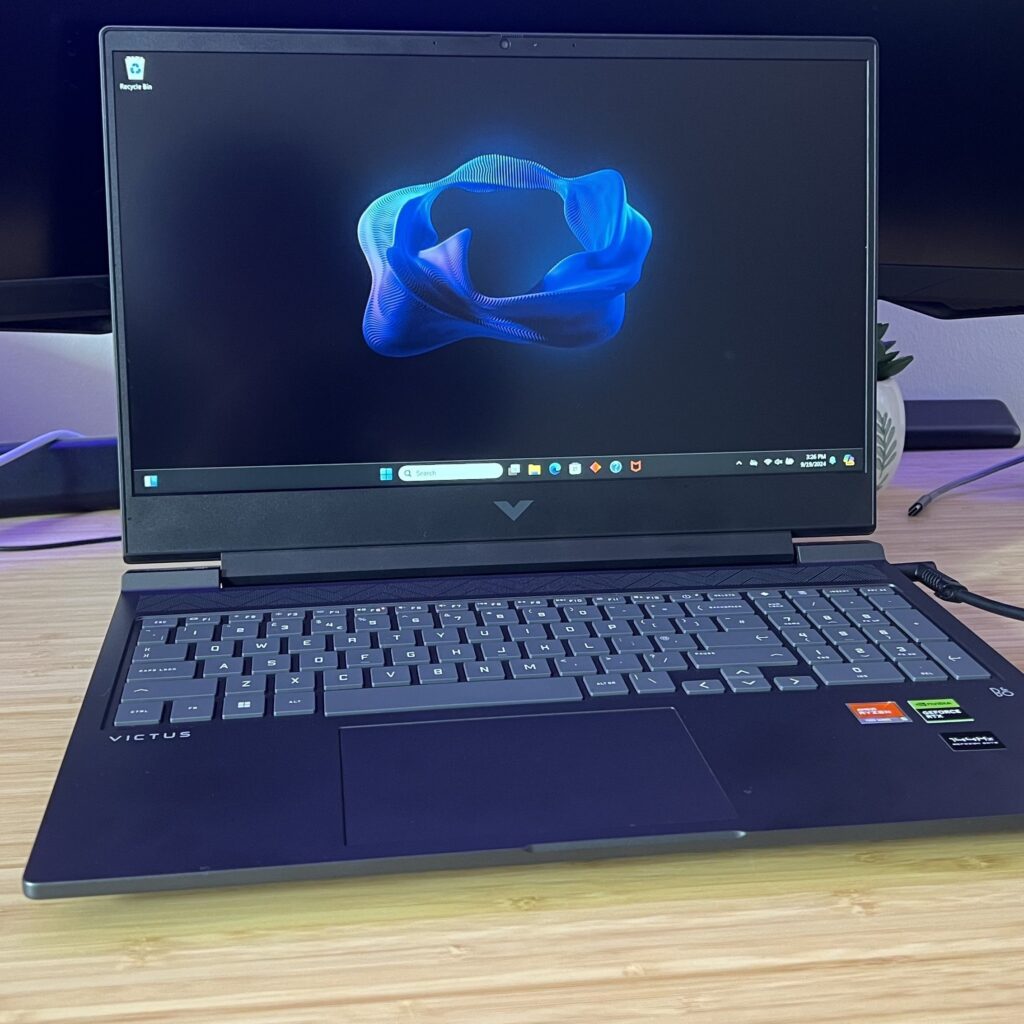
Spec Comparison Summary
| Specification | HP Victus 16 (RTX 4050) | Our Master Spec |
| GPU | RTX 4050 (6GB, ~75W) | RTX 4070 (8GB, 140W) |
| CPU | i5-13500H / i7-13700H | i7-12700H / Ryzen 7 7840HS |
| RAM | 16GB DDR5 (Upgradeable) | 32GB DDR5 |
| Storage | 512GB / 1TB NVMe SSD | 1TB NVMe SSD |
| Display | 16.1″ 1080p 144Hz | 1440p 165Hz |
| Cooling | Dual-fan, simplified design | Dual-fan / Vapor chamber |
| Best Use Case | Light AAA + Indie GOTY titles | All GOTY 2025 titles |
Review
The HP Victus 16 is designed for one very specific purpose: affordable, straightforward gaming without unnecessary extras. It’s the most budget-friendly laptop in this category, yet it performs reliably thanks to the RTX 4050 and modern Intel CPUs. While not as thermally efficient or polished as ASUS TUF or Lenovo LOQ, the Victus delivers genuinely good gaming performance for the price — especially in stylized, competitive, and indie-focused titles.
Where the Victus stands out is value. You get a big 16-inch screen, a comfortable keyboard, and a clean minimalist chassis without the “gamer laptop” aesthetic. It’s a no-frills machine that quietly does its job: run today’s games smoothly and stay reasonably cool under load. Among community feedback, the Victus is known as “the safe starter option” for players upgrading from an older laptop or buying their first gaming notebook.
Who It’s For
First-Time Buyers
🏠 Home Users
GOTY Titles This Laptop Can Run Smoothly
- Hades II — 1080p High
- Hollow Knight: Silksong — Max settings
- Marvel Rivals — 1080p High
- Peak
- Blue Prince
- Dispatch
- Monster Hunter Wilds — 1080p Medium + DLSS
- Battlefield 6 — 1080p Medium
4) Lenovo Legion 5 Pro (RTX 4060–4070)
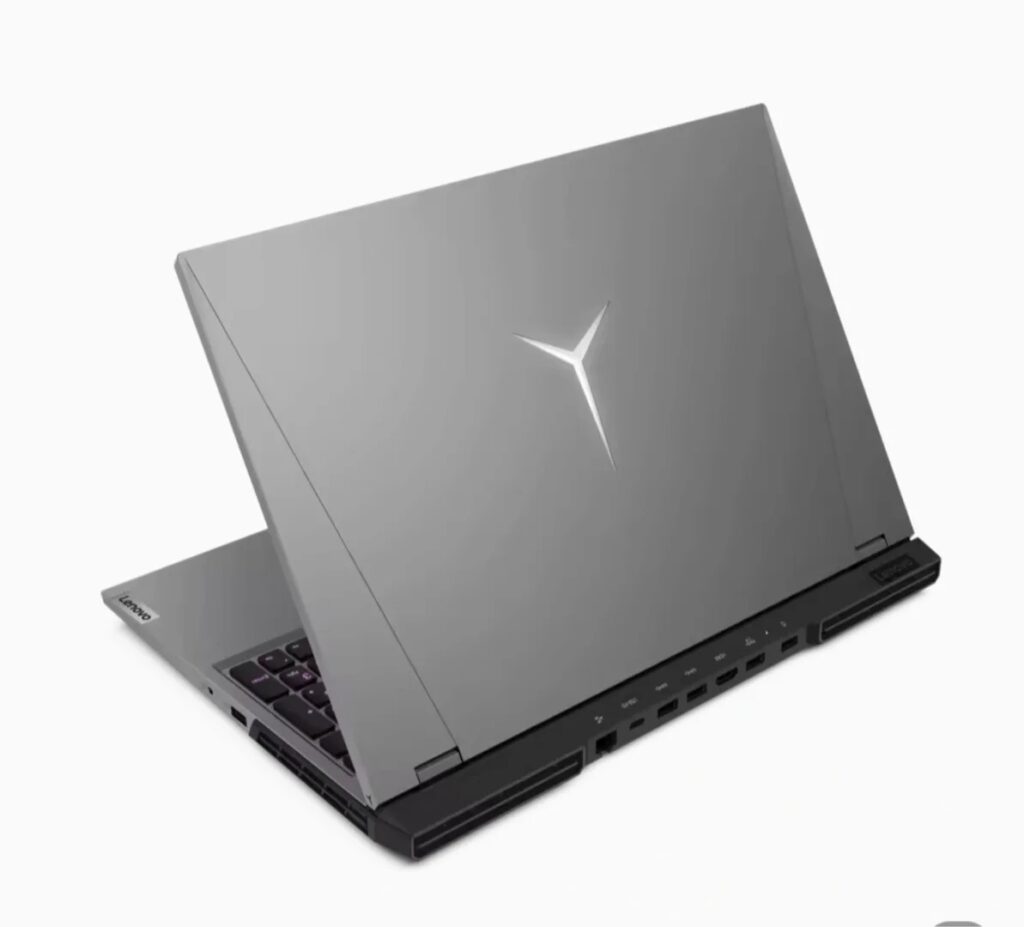
Spec Comparison Summary
| Specification | Lenovo Legion 5 Pro (RTX 4060–4070) | Our Master Spec |
| GPU | RTX 4060 (115–140W) / RTX 4070 (140W) | RTX 4070 (8GB, 140W) |
| CPU | Ryzen 7 7745HX / Intel i7-13700HX | i7-12700H / Ryzen 7 7840HS |
| RAM | 16–32GB DDR5 | 32GB DDR5 |
| Storage | 512GB / 1TB NVMe | 1TB NVMe SSD |
| Display | 16″ 2560×1600, 165Hz | 1440p 165Hz |
| Cooling | Legion ColdFront, dual-fan, high wattage | Vapor chamber / dual-fan |
Review
The Legion 5 Pro has long been one of the most respected mid-to-high tier gaming laptops, and this generation continues that streak. It delivers some of the highest sustained wattage for RTX 4060 and 4070 GPUs, which translates to cleaner frame pacing, better 1% lows, and more stable performance in demanding AAA titles. Paired with Lenovo’s highly regarded ColdFront cooling and a bright 16-inch 1600p display, the 5 Pro consistently performs above its weight class.
In gaming communities, the Legion 5 Pro is often referred to as the “default choice for serious gamers who don’t want to overspend.” It’s not as flashy as ROG Strix or as premium as Blade 16, but when it comes to raw gaming output, cooling, brightness, ergonomics, and long-term reliability, very few laptops in this price tier compete.
For players aiming to run modern AAA GOTY titles at 1440p without worrying about thermals or GPU throttling, the Legion 5 Pro is one of the safest recommendations.
Who It’s For
🎮 Performance-Focused
🧊 Thermals-Conscious
💻 Long-Sesh Gamers
The Legion 5 Pro is built for gamers who want near-desktop performance in a portable format. If you’re someone who plays visually intensive titles — open-world RPGs, cinematic action games, large-scale shooters — and you prefer running them at 1440p instead of scaling down to 1080p, this laptop fits naturally into your setup.
It also suits users who value long-term performance stability. The high-wattage GPU modes and mature cooling system allow it to maintain high FPS without thermal dips, making it excellent for players who marathon one major title for hours at a time.
GOTY Titles This Laptop Can Run Smoothly
- Monster Hunter Wilds — 1440p High (DLSS)
- Battlefield 6 — 1440p High / Ultra
- Indiana Jones and the Great Circle — 1440p High
- Expedition 33 — 1440p High
- Marvel Rivals — 1440p Max
- Hades II — 1440p Max
- Hollow Knight: Silksong — Max settings
- Peak
- Blue Prince
- Dispatch
- Kingdom Come: Deliverance II — 1440p High / Ultra
5) MSI Katana 17 (RTX 4070)
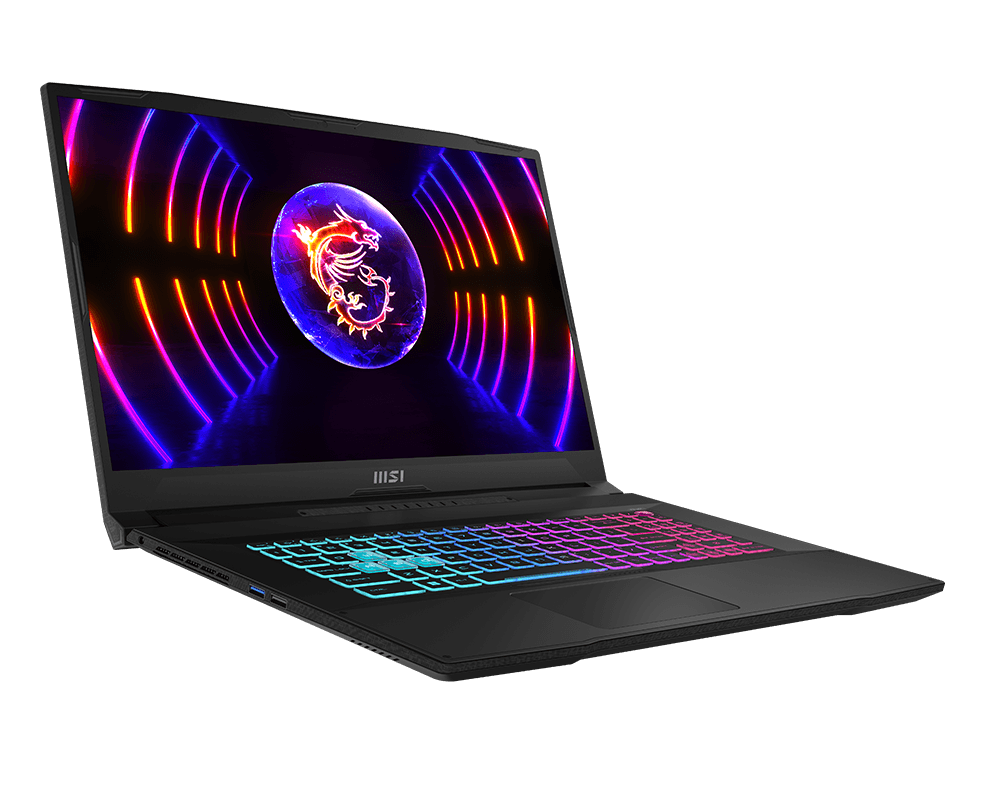
Spec Comparison Summary
| Specification | MSI Katana 17 (RTX 4070) | Our Master Spec |
| GPU | RTX 4070 (105–140W, model-dependent) | RTX 4070 (8GB, 140W) |
| CPU | Intel Core i7-13620H / i7-13700H | i7-12700H / Ryzen 7 7840HS |
| RAM | 16GB DDR5 | 32GB DDR5 |
| Storage | 512GB / 1TB NVMe | 1TB NVMe SSD |
| Display | 17.3″ 1080p 144Hz | 1440p 165Hz |
| Cooling | Dual-fan Cooler Boost 5 | Dual-fan / Vapor chamber |
Review
The MSI Katana 17 fills a very specific niche: big-screen, big-performance gaming without the premium price tag. With a 17-inch panel and an RTX 4070, it delivers the kind of screen real estate and GPU horsepower usually reserved for higher-end machines — but in a more accessible package. Its design and feature set are straightforward, but the value comes from raw performance output rather than bells and whistles.
If you’re a gamer who simply wants a large canvas for immersive worlds and higher visibility in competitive titles, the Katana 17 offers great performance-per-dollar.
Who It’s For
🎬 Large-Screen
🎮 AAA Players
💸 Performance Seekers
The Katana 17 is perfect for gamers who prioritize big displays and big performance over portability. If you mostly play at home, enjoy cinematic single-player titles, or need a setup that doubles as a “desktop replacement,” the Katana’s 17-inch panel gives you better visibility, bigger HUD layouts, and a more comfortable viewing distance.
It’s also ideal for players upgrading from smaller 15-inch laptops or external monitors — those who want more immersion without investing in a full desktop rig.
GOTY Titles This Laptop Can Run Smoothly
- Monster Hunter Wilds — 1080p High (DLSS)
- Battlefield 6 — 1080p High / Ultra
- Indiana Jones and the Great Circle — 1080p High
- Kingdom Come: Deliverance II — 1080p High
- Expedition 33 — 1080p High
- Marvel Rivals — 1080p/1440p Max
- Hades II — Max settings
- Hollow Knight: Silksong — Max settings
- Peak
- Blue Prince
- Dispatch
6) MSI Raider GE68 HX (RTX 4080)
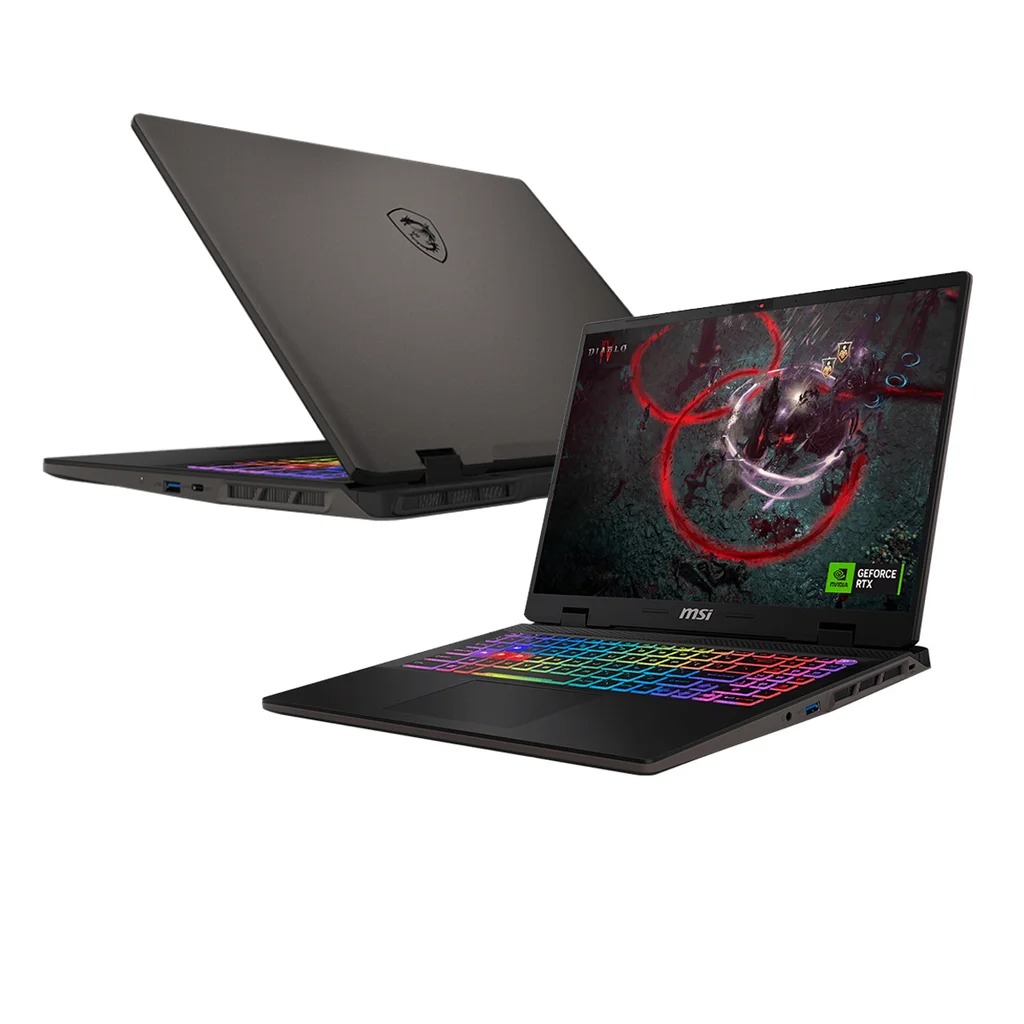
Spec Comparison Summary
| Specification | MSI Raider GE68 HX (RTX 4080) | Our Master Spec |
| GPU | RTX 4080 (175W full power) | RTX 4070 (8GB, 140W) |
| CPU | Intel Core i9-13980HX / i9-14900HX | i7-12700H / Ryzen 7 7840HS |
| RAM | 32GB DDR5 | 32GB DDR5 |
| Storage | 1TB NVMe SSD | 1TB NVMe SSD |
| Display | 16″ 2560×1600 240Hz | 1440p 165Hz |
| Cooling | Cooler Boost 5 / high-capacity | Vapor chamber / dual fan |
Review
The MSI Raider GE68 HX is one of the most aggressively tuned performance laptops in the entire gaming market. Unlike more balanced systems, the Raider is intentionally designed to push wattage, thermals, and GPU boost clocks as high as possible. The result is desktop-like performance in a portable form factor — especially ideal for 1440p Ultra and ray-traced settings.
The 4080 inside the Raider regularly outperforms many competitors due to its consistently high power limits (up to 175W) and strong cooling architecture. Paired with an HX-series Intel CPU, it’s built to handle the heaviest Game Awards 2025 nominees, from large-scale shooters to demanding open-world RPGs. Community sentiment often describes the Raider as “the closest you can get to a gaming desktop without buying a tower.”
Who It’s For
💻 Desktop-Grade
🎥 Streamers
The Raider GE68 HX is engineered for gamers who want maximum performance with zero compromise. If your gaming library includes visually demanding titles, ray-traced modes, Unreal Engine 5 games, or anything that pushes modern hardware, the Raider handles them without hesitation.
It is perfect for players who:
- run 1440p Ultra as their default
- want their laptop to outperform mid-range desktops
- record, stream, or multitask while gaming
- prefer a gaming-first machine over portability or battery life
This is the laptop for enthusiasts who treat gaming performance as their number one priority and consider fan noise and power draw a fair trade for top-tier frame rates.
GOTY Titles This Laptop Can Run Smoothly
- Monster Hunter Wilds — 1440p Ultra (DLSS Quality)
- Battlefield 6 — 1440p Ultra
- Indiana Jones and the Great Circle — 1440p Ultra
- Expedition 33 — 1440p Ultra
- Kingdom Come: Deliverance II — 1440p High / Ultra
- Marvel Rivals — 1440p Max
- Hades II — Max settings
- Hollow Knight: Silksong — Max settings
- Peak
- Blue Prince
- Dispatch
7) Razer Blade 16 (RTX 4080)
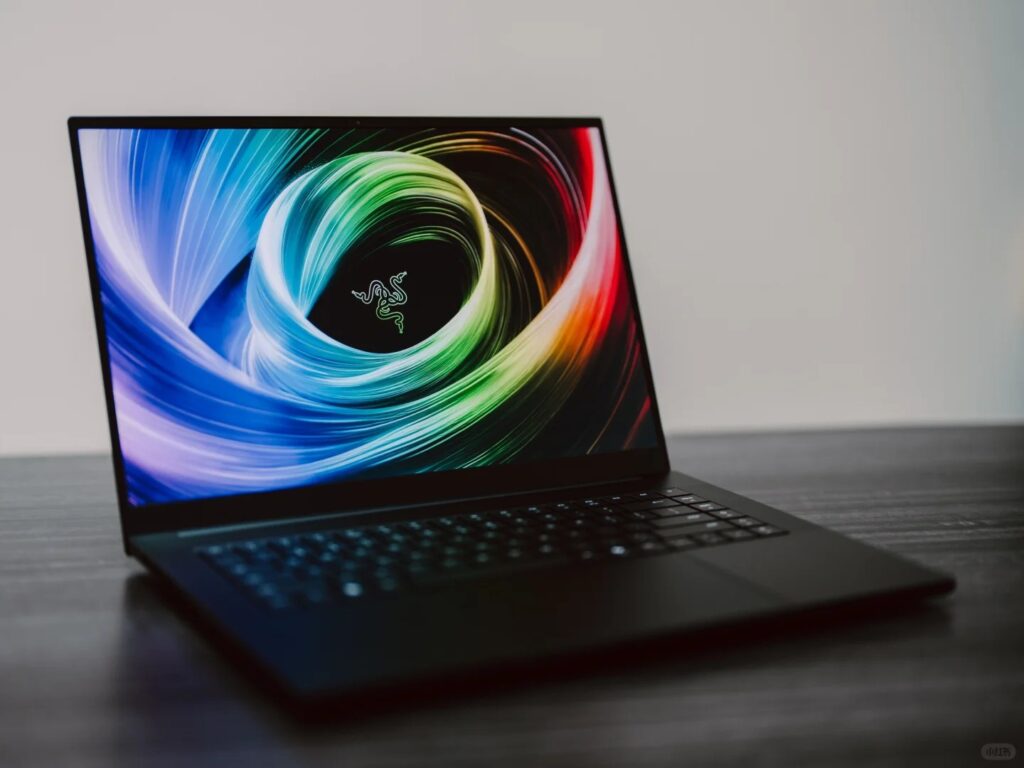
Spec Comparison Summary
| Specification | Razer Blade 16 (RTX 4080) | Our Master Spec |
| GPU | RTX 4080 (up to 175W) | RTX 4070 (8GB, 140W) |
| CPU | Intel Core i9-13950HX / i9-14900HX | i7-12700H / Ryzen 7 7840HS |
| RAM | 32GB DDR5 (soldered) | 32GB DDR5 |
| Storage | 1TB NVMe | 1TB NVMe |
| Display | 16″ Dual-Mode Mini-LED (4K 120Hz / FHD 240Hz) | 1440p 165Hz |
| Cooling | Vapor Chamber | Vapor chamber / dual fan |
Review
The Razer Blade 16 is the closest thing the laptop industry has to a luxury sports car: premium CNC aluminum build, Mini-LED display, vapor-chamber cooling, and a tuning philosophy that prioritizes stability and acoustics without sacrificing performance. The RTX 4080 variant delivers strong 1440p and even playable 4K performance thanks to DLSS, while the Mini-LED panel makes HDR-friendly Game Awards 2025 titles visually spectacular.
If you want a machine that handles both heavy content creation and high-end gaming, the Blade 16 stands at the top of the ecosystem.
Who It’s For
🖥️ LED Enthusiasts
💼 Professionals
The Razer Blade 16 is perfect for gamers who also create, edit, stream, or work in visual fields where color accuracy matters as much as frame rates. The Mini-LED HDR display elevates cinematic Game Awards 2025 titles, while its precise color calibration makes it ideal for artists, editors, and 3D designers who want one machine for both work and play.
It also suits users who prioritize a premium, understated aesthetic rather than a flashy gaming look — professionals who want a laptop they can bring to meetings by day and use for high-end gaming by night. If you want a single device that merges MacBook-level craftsmanship with PC gaming hardware, the Blade 16 is uniquely positioned to offer that experience.
GOTY Titles This Laptop Can Run Smoothly
- Monster Hunter Wilds — 1440p Ultra / 4K High (DLSS)
- Battlefield 6 — 1440p Ultra
- Indiana Jones and the Great Circle — 4K High (DLSS Quality)
- Expedition 33 — 1440p Ultra
- Kingdom Come: Deliverance II — 1440p Ultra
- Marvel Rivals — 1440p/4K Max
- Hades II — Max settings
- Hollow Knight: Silksong — Max settings
- Peak
- Blue Prince
- Dispatch
Hardware Considerations for GOTY 2025
Even though GOTY nominees span different genres, they share one thing in common: they all push modern hardware in ways that older AAA titles didn’t. Before we jump into laptop recommendations, here are the components that matter most if you want a machine ready for both today’s hits and next year’s releases.
If you’re interested with the GOTY 2023 and 2024, feel free to check out our article about Can Your PC Run GOTY 2023 & 2024 Winners.
VRAM: Why 8–12GB Matters More Than Ever
2025’s GOTY contenders lean heavily on large texture loads, bigger open worlds, and new-gen rendering features (ray tracing, global illumination, Unreal Engine 5 assets). All of these consume VRAM fast.
8GB is still fully usable — especially at 1080p and 1440p High. But it also represents the minimum comfort zone moving forward.
If you want fewer stutters, better 1% lows, and smoother asset streaming across upcoming titles, 10–12GB is the safer headroom tier. This is exactly why GPUs like the RTX 4070 feel significantly more stable in long sessions compared to the 4060, even when their average FPS looks similar.
In simple terms:
VRAM isn’t about raw FPS — it’s about consistent performance for long, modern sessions.
RAM: Why 32GB Is Becoming the New “Comfortable” Tier
Let’s be clear: 16GB can still run every GOTY nominee on our list.
But the experience is tighter than it used to be. Modern engines (especially UE5 titles) rely heavily on background asset streaming, shader compilation, and cache building. And most players don’t run games in a vacuum — they have:
- Chrome tabs
- Discord
- Steam overlay
- Custom RGB tools
- Maybe even OBS for gameplay capture
All of this eats into system memory. 32GB isn’t a luxury anymore — it’s breathing room.
It keeps your laptop from dipping into pagefile usage, which is a common cause of microstutters in long open-world sessions. If you want a GOTY-ready laptop that stays smooth for the next 3–4 years, 32GB is the practical sweet spot.
Storage: Why 1TB Is the Realistic 2025 Baseline
Most GOTY-level AAA games now land somewhere between 90GB and 150GB, and that’s before day-one patches, DLC packs, or shader cache files.
You can get by with 512GB — but you’ll be uninstalling games more often than you’d like. Windows 11 alone takes a surprising chunk once updates and recovery partitions have their share.
Meanwhile, NVMe SSD speeds genuinely improve loading times, fast travel, and world streaming in bigger titles. So 1TB isn’t about “more games installed.” It’s about a smoother, friction-free experience. If you’re gaming seriously in 2025, 1TB should be your baseline.
CPU Priorities: Single-Core and Multi-Core Both Matter
Some players think gaming is all about single-core speed. Others believe the core count is king.
GOTY titles in 2025 require both. Open-world nominees like Monster Hunter Wilds, Indiana Jones, and Kingdom Come II split tasks across many threads:
- world simulation
- AI behaviour
- object physics
- streaming of high-res assets
- background loading or decompression
A strong single-core keeps your frame rate consistent during combat, while 12–16 threads help your world load fast and stutter-free. You don’t need a top-end HX chip — but you do want:
- a modern Intel i7 or
- a Ryzen 7 with good boost clocks
This gives you the ideal balance for both cinematic and simulation-heavy GOTY titles.
1440p High Refresh vs 1080p Very High Refresh
Most GOTY nominees lean more cinematic than competitive — meaning resolution matters more than raw FPS.
Here’s the simplest way to break it down:
“If you play mainly cinematic or open-world GOTY titles”
→ 1440p 165–240Hz is the sweet spot.
Sharper visuals, better foliage detail, cleaner UI, and a noticeable jump in image quality over 1080p.
“If you play more competitive titles (Marvel Rivals, Dispatch)”
→ 1080p 165–240Hz still makes sense.
Many of the laptops in our list offer both options, but for the bulk of GOTY 2025’s lineup — especially visually ambitious titles — 1440p high refresh offers the best balance between clarity and performance. And if you’re on something like the Razer Blade 16’s Mini-LED panel, HDR becomes a genuine visual upgrade, not just a checkbox.
Our Opinion on Game Awards 2025
Looking at this year’s GOTY 2025 nominees from a hardware angle, the list paints a clear picture of where modern PC gaming is heading. These titles might differ in genre, pacing, and artistic direction, but the underlying technology behind them is surprisingly consistent: bigger worlds, heavier assets, smarter AI, and engines that finally expect players to have SSD-level bandwidth and mid-tier GPUs as a baseline—not an upgrade.
Which Game Awards 2025 Nominees Are the Most Demanding?
A few games on the GOTY 2025 shortlist stand out as genuine stress tests:
- Monster Hunter Wilds – dense environments, large biomes, high-resolution textures
- Battlefield 6 – heavy CPU load due to large-player simulations & destructible environments
- Kingdom Come: Deliverance II – detailed medieval worldbuilding + high geometry density
- Indiana Jones and the Great Circle – cinematic lighting + HDR assets
These are the types of titles that push both VRAM (8–12GB) and RAM (16–32GB) harder than previous generations. They also define the kind of real-world performance gamers can expect from mid- to high-end hardware over the next few years.
Which Titles Are Surprisingly Well-Optimised?
On the flip side, several nominees and adjacent titles deliver excellent performance without needing aggressive hardware:
- Hades II
- Hollow Knight: Silksong
- Blue Prince
- Peak
- Dispatch
These games demonstrate that 2025 isn’t purely about giant engines or enormous VRAM footprints. Players with RTX 4050/4060 laptops can still enjoy a large portion of GOTY contenders at their absolute best.
This is why “GOTY 2025 optimization” isn’t a single trend—it’s a mix of big-budget technical showcases and highly polished, lightweight indie experiences.
Conclusion
The GOTY 2025 nominees aren’t just great games—they’re a practical benchmark for where PC gaming is heading. These titles reflect a clear trend: bigger worlds, heavier textures, smarter AI, and engines that expect SSD speeds and mid-tier GPUs as the new normal.
If your goal is to buy a laptop that handles both this year’s GOTY contenders and the next few years of AAA releases, you don’t need to overspend. The sweet spot is now clear:
- RTX 4060 laptops are the new entry point for reliable 1080p–1440p gaming.
- RTX 4070 laptops deliver the best balance of price, performance, and future longevity.
- RTX 4080 laptops are for players who want 1440p Ultra or 4K HDR experiences.
Use the tables and recommendations in this guide to check if your current laptop still holds up—or to plan a smart upgrade during the year-end and post-CES promotions. With the right timing, you can land a powerful machine at a much better price.
Game Awards 2025 sets a high bar, but with the right hardware, you’ll be ready for everything the next few years of PC gaming bring.
FAQ
1. Can my current laptop run all Game Awards 2025 games?
The biggest limitations tend to be VRAM (8GB) and storage capacity, since many modern games exceed 80–100GB each.
Older GTX-series GPUs or 512GB SSDs will require compromises.
2. Is an RTX 4050 laptop enough for Game Awards 2025 titles?
It’s not ideal for 1440p or heavy ray-tracing titles, but it’s still a viable mainstream choice.
If you want fewer compromises and better longevity, the RTX 4060 is a meaningful step up.
3. Do I really need 32GB of RAM for modern AAA games?
All GOTY 2025 games still run on 16GB, but 32GB reduces microstutters, handles background apps more smoothly,
and helps UE5 titles manage asset streaming without hitching.
If you multitask heavily while gaming, 32GB is worth it.
4. Is it better to buy a cheaper 1080p laptop or invest in a 1440p screen?
If you play more competitive titles, 1080p 165–240Hz still makes sense.
But for GOTY 2025’s lineup specifically, 1440p high refresh offers the best overall experience.
5. How long will a GOTY 2025–ready laptop stay relevant?
RTX 4060 laptops comfortably last around 2–3 years, depending on settings and future engine demands.
6. Can integrated graphics (like Radeon 780M) handle any GOTY 2025 nominees?
Hades II, Silksong, Dispatch, Blue Prince, Peak are all playable on modern integrated GPUs.
Heavier AAA nominees such as Monster Hunter Wilds, Battlefield 6, and Indiana Jones require a dedicated GPU for smooth performance.
{ "@type": "BlogPosting", "headline": "Best Gaming Laptop for Game Awards 2025 : Specs Reviewed", "alternativeHeadline": "GOTY 2025 Hardware Guide – Best Gaming Laptops for Every Nominee", "description": "A technical breakdown of GOTY 2025 laptop requirements, performance trends, and the best RTX 4060 / 4070 models for modern AAA gaming.", "datePublished": "2025-11-19", "dateModified": "2025-11-19", "author": { "@type": "Person", "name": "Mike Loo" }, "contributor": { "@type": "Person", "name": "Kristine Tang" }, "publisher": { "@type": "Organization", "name": "Bright Side of News", "logo": { "@type": "ImageObject", "url": "https://brightsideofnews.com/wp-content/uploads/bsn-logo.png" } }, "mainEntityOfPage": { "@type": "WebPage", "@id": "https://brightsideofnews.com/gaming-hardware/best-gaming-laptop-for-game-awards-2025/" }, "about": [ {"@type": "Thing", "name": "GOTY 2025"}, {"@type": "Thing", "name": "Gaming Laptop Requirements"}, {"@type": "Thing", "name": "Game Awards 2025"} ], "keywords": ["GOTY 2025","Game Awards 2025","gaming laptop","RTX 4060","RTX 4070","system requirements"] },
{ "@type": "BreadcrumbList", "itemListElement": [ {"@type": "ListItem","position": 1,"name": "Home","item": "https://brightsideofnews.com/"}, {"@type": "ListItem","position": 2,"name": "Gaming Hardware","item": "https://brightsideofnews.com/gaming-hardware/"}, {"@type": "ListItem","position": 3,"name": "Best Gaming Laptop for Game Awards 2025","item": "https://brightsideofnews.com/gaming-hardware/best-gaming-laptop-for-game-awards-2025/"} ] },
{ "@type": "FAQPage", "mainEntity": [ { "@type": "Question", "name": "Can my current laptop run all GOTY 2025 games?", "acceptedAnswer": {"@type":"Answer","text":"Most RTX 3060/3070 or 4060 laptops can play GOTY 2025 titles at 1080p–1440p with tuned settings; older GPUs or 512GB storage may struggle."} }, { "@type": "Question", "name": "Is an RTX 4050 laptop enough for GOTY 2025 titles?", "acceptedAnswer": {"@type":"Answer","text":"Yes for 1080p gaming; it handles most nominees at Medium–High settings. For 1440p or long-term use, RTX 4060 is safer."} }, { "@type": "Question", "name": "Do I really need 32GB RAM for modern AAA games?", "acceptedAnswer": {"@type":"Answer","text":"16GB still works, but 32GB reduces microstutter and improves multitasking for UE5 titles and long sessions."} }, { "@type": "Question", "name": "Is it better to buy a cheaper 1080p laptop or 1440p screen?", "acceptedAnswer": {"@type":"Answer","text":"For cinematic GOTY titles 1440p is sharper and balanced; 1080p 165–240Hz suits competitive players."} }, { "@type": "Question", "name": "How long will a GOTY 2025-ready laptop stay relevant?", "acceptedAnswer": {"@type":"Answer","text":"RTX 4070 systems remain strong for 3–4 years of new AAA games; RTX 4060 models around 2–3 years."} }, { "@type": "Question", "name": "Can integrated graphics like Radeon 780M run GOTY 2025 titles?", "acceptedAnswer": {"@type":"Answer","text":"Only lighter indie nominees such as Hades II, Silksong, and Dispatch are playable on integrated GPUs."} } ] },
{ "@type": "ItemList", "name": "Best Gaming Laptops for Game Awards 2025", "itemListOrder": "ItemListOrderAscending", "numberOfItems": 9, "itemListElement": [ {"@type":"ListItem","position":1,"item":{"@type":"Product","name":"Lenovo LOQ 16 (RTX 4060)"}}, {"@type":"ListItem","position":2,"item":{"@type":"Product","name":"ASUS TUF A16 (RTX 4050 / 4060)"}}, {"@type":"ListItem","position":3,"item":{"@type":"Product","name":"HP Victus 16 (RTX 4050)"}}, {"@type":"ListItem","position":4,"item":{"@type":"Product","name":"Lenovo Legion 5 Pro (RTX 4060–4070)"}}, {"@type":"ListItem","position":5,"item":{"@type":"Product","name":"ASUS ROG Strix G16 (RTX 4060)"}}, {"@type":"ListItem","position":6,"item":{"@type":"Product","name":"MSI Katana 17 (RTX 4070)"}}, {"@type":"ListItem","position":7,"item":{"@type":"Product","name":"MSI Raider GE68 HX (RTX 4080)"}}, {"@type":"ListItem","position":8,"item":{"@type":"Product","name":"Lenovo Legion 7i Pro (RTX 4080)"}}, {"@type":"ListItem","position":9,"item":{"@type":"Product","name":"Razer Blade 16 (RTX 4080)"}} ] },
{ "@type": "Review", "itemReviewed": {"@type": "Product","name": "Lenovo LOQ 16 (RTX 4060)","brand": "Lenovo","category": "Gaming Laptop"}, "reviewRating": {"@type": "Rating","ratingValue": "4.3","bestRating": "5","worstRating": "1"}, "author": {"@type": "Person","name": "Mike Loo"}, "publisher": {"@type": "Organization","name": "Bright Side of News"} }, { "@type": "Review", "itemReviewed": {"@type": "Product","name": "ASUS TUF A16 (RTX 4050 / 4060)","brand": "ASUS","category": "Gaming Laptop"}, "reviewRating": {"@type": "Rating","ratingValue": "4.2","bestRating": "5","worstRating": "1"}, "author": {"@type": "Person","name": "Mike Loo"}, "publisher": {"@type": "Organization","name": "Bright Side of News"} }, { "@type": "Review", "itemReviewed": {"@type": "Product","name": "HP Victus 16 (RTX 4050)","brand": "HP","category": "Gaming Laptop"}, "reviewRating": {"@type": "Rating","ratingValue": "4.0","bestRating": "5","worstRating": "1"}, "author": {"@type": "Person","name": "Mike Loo"}, "publisher": {"@type": "Organization","name": "Bright Side of News"} }, { "@type": "Review", "itemReviewed": {"@type": "Product","name": "Lenovo Legion 5 Pro (RTX 4060–4070)","brand": "Lenovo","category": "Gaming Laptop"}, "reviewRating": {"@type": "Rating","ratingValue": "4.6","bestRating": "5","worstRating": "1"}, "author": {"@type": "Person","name": "Mike Loo"}, "publisher": {"@type": "Organization","name": "Bright Side of News"} }, { "@type": "Review", "itemReviewed": {"@type": "Product","name": "ASUS ROG Strix G16 (RTX 4060)","brand": "ASUS","category": "Gaming Laptop"}, "reviewRating": {"@type": "Rating","ratingValue": "4.5","bestRating": "5","worstRating": "1"}, "author": {"@type": "Person","name": "Mike Loo"}, "publisher": {"@type": "Organization","name": "Bright Side of News"} }, { "@type": "Review", "itemReviewed": {"@type": "Product","name": "MSI Katana 17 (RTX 4070)","brand": "MSI","category": "Gaming Laptop"}, "reviewRating": {"@type": "Rating","ratingValue": "4.4","bestRating": "5","worstRating": "1"}, "author": {"@type": "Person","name": "Mike Loo"}, "publisher": {"@type": "Organization","name": "Bright Side of News"} }, { "@type": "Review", "itemReviewed": {"@type": "Product","name": "MSI Raider GE68 HX (RTX 4080)","brand": "MSI","category": "Gaming Laptop"}, "reviewRating": {"@type": "Rating","ratingValue": "4.7","bestRating": "5","worstRating": "1"}, "author": {"@type": "Person","name": "Mike Loo"}, "publisher": {"@type": "Organization","name": "Bright Side of News"} }, { "@type": "Review", "itemReviewed": {"@type": "Product","name": "Lenovo Legion 7i Pro (RTX 4080)","brand": "Lenovo","category": "Gaming Laptop"}, "reviewRating": {"@type": "Rating","ratingValue": "4.8","bestRating": "5","worstRating": "1"}, "author": {"@type": "Person","name": "Mike Loo"}, "publisher": {"@type": "Organization","name": "Bright Side of News"} }, { "@type": "Review", "itemReviewed": {"@type": "Product","name": "Razer Blade 16 (RTX 4080)","brand": "Razer","category": "Gaming Laptop"}, "reviewRating": {"@type": "Rating","ratingValue": "4.9","bestRating": "5","worstRating": "1"}, "author": {"@type": "Person","name": "Mike Loo"}, "publisher": {"@type": "Organization","name": "Bright Side of News"} }
] }


Crypto Casino Withdrawal Fees Explained: What You Actually Pay

Why Is My Crypto Withdrawal Taking So Long? (Confirmations, Network, Fees)

USDT vs Bitcoin Casino Withdrawals: Speed, Fees & Risks Compared

Crypto vs E-Wallet Casino Withdrawals: Speed, Fees, Risks Compared

Responsible Gambling Controls in Regulated Markets (UK/AU) and How They Work

Name Mismatch: Why Wallet/Bank Names Must Match Casino Profiles

Best Casino Withdrawal Methods (Speed, Fees, Safety Compared)

AML in iGaming: Common Red Flags That Trigger Reviews

8 Nhà Cái Uy Tín Nhất Hiện Nay Tại Việt Nam Với Ưu Đãi Tặng Tiền Và Tỷ Lệ Cược Hấp Dẫn
